← Blip

Changelog

New features and improvements, newest first.

Guides for AI agents and DataFast sales

Two new guides. One makes Claude Code, Cursor, or any coding agent buzz your iPhone when it stops, with a copy-paste Stop hook: one HTTP call, nothing to install. The other gets you a push for every sale you track in DataFast: on Stripe it is one pasted webhook URL, anywhere else one extra fetch beside the call you already make to DataFast.
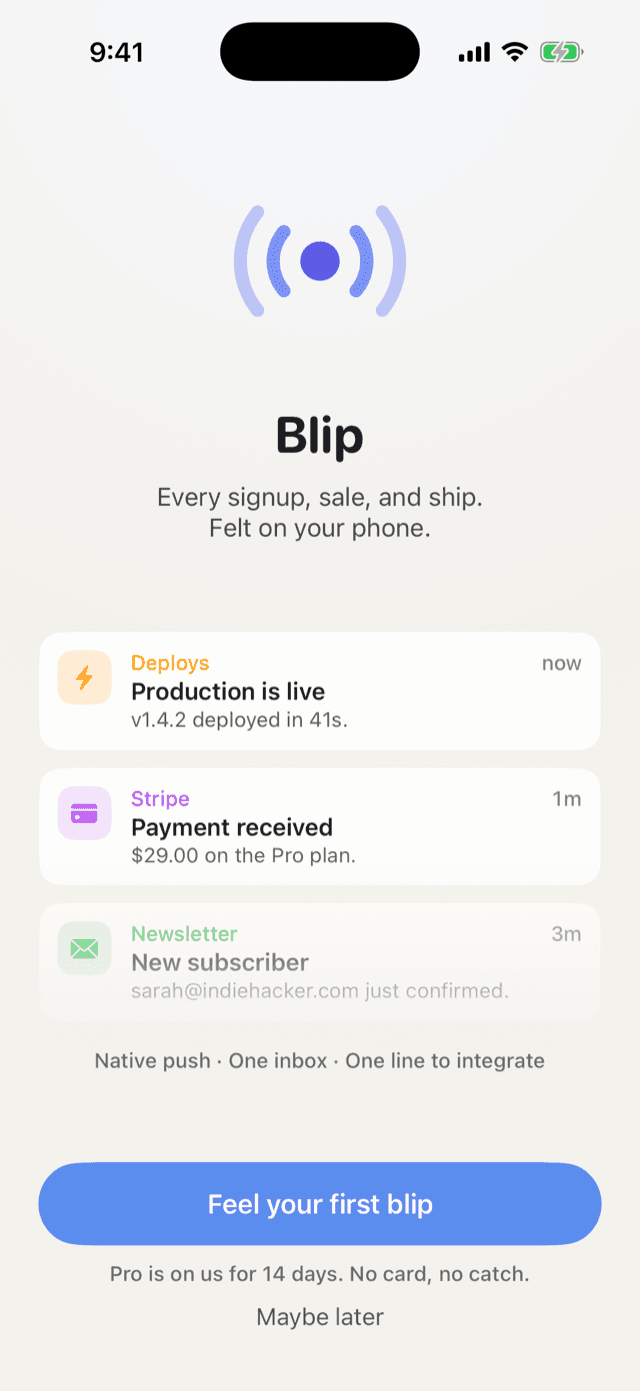
Feel it before you pay

Onboarding is now one tap: “Feel your first blip” asks for notification permission and lands a real push on your lock screen before you see anything else. Every new account starts with 14 days of full Pro, no card and no payment sheet; the subscription only speaks up when the trial ends. The inbox also picks up new blips the moment they arrive, and channel icons now load instantly.

Blip's welcome screen: demo notifications and the 'Feel your first blip' button
  • One tap, one real push
  • 14 days of Pro, free
  • No account, no card

The app goes light, and Blip Pro arrives

A full redesign on a warm, light canvas: a day-grouped inbox with swipe to read or unread, a money summary for what arrived while you were away, and channel icons pulled from each site’s own favicon. Blip Pro is live too, at $29.99/year (or $9/month) for unlimited channels, webhook URLs, and pushes.

The Blip inbox on iPhone, notifications grouped by channel
  • Filter by channel
  • Unread at a glance
  • Grouped by day

Live on the App Store, with one simple plan

Blip 1.0 is out: install it, mint a channel, and your next signup lands on your lock screen. Pricing is one decision: everything is free for 14 days, then Pro ($29.99/yr or $9/mo) keeps unlimited channels, webhook URLs, and pushes flowing.

Channels and their keys in the Blip iOS app
  • Filter by channel
  • Unread at a glance
  • Grouped by day

Paste a URL, get pushes

Every channel key now powers webhook URLs: point Stripe, GitHub, or Vercel at hooks/<provider>/<key> and events arrive as readable pushes, like a checkout landing as "Payment received: $29.00" or a failed deploy hitting with high priority. A generic hook takes JSON from anything else, and rotating the key kills a leaked URL.

Stripe · webhook settings · endpoint URL
https://blipnotify.com/api/v1/hooks/stripe/blip_live_xxx
checkout.session.completed → "Payment received: $29.00"
The 'Payment received' notification open in the Blip iOS app

The iOS app landed

The native iOS app brings every event into one clean inbox, split into the channels you name, with unread counts and day sections. No more scrolling a Slack channel full of webhook noise to find the ping that matters.

The Blip inbox on iPhone, notifications grouped by channel
  • Filter by channel
  • Unread at a glance
  • Grouped by day

One HTTP call to your lock screen

Anything that can send an HTTP request can push straight to your phone: one POST with a channel key, delivered as a real notification through Apple. No third-party relay sits in the middle reading your events.

Any backend, cron, or Zap
curl -X POST https://blipnotify.com/api/v1/notify \
-H "Authorization: Bearer blip_live_xxx" \
-d '{"title":"Payment received","body":"$29.00 on the Pro plan"}'
201 · pushed to your iPhone
The 'Payment received' notification open in the Blip iOS app

Want new features in your inbox? Join the launch list.